





Lobster’s Key 11 Questions: The Most Accessible Breakdown of OpenClaw’s Principles
Compiled by | Odaily Suzz
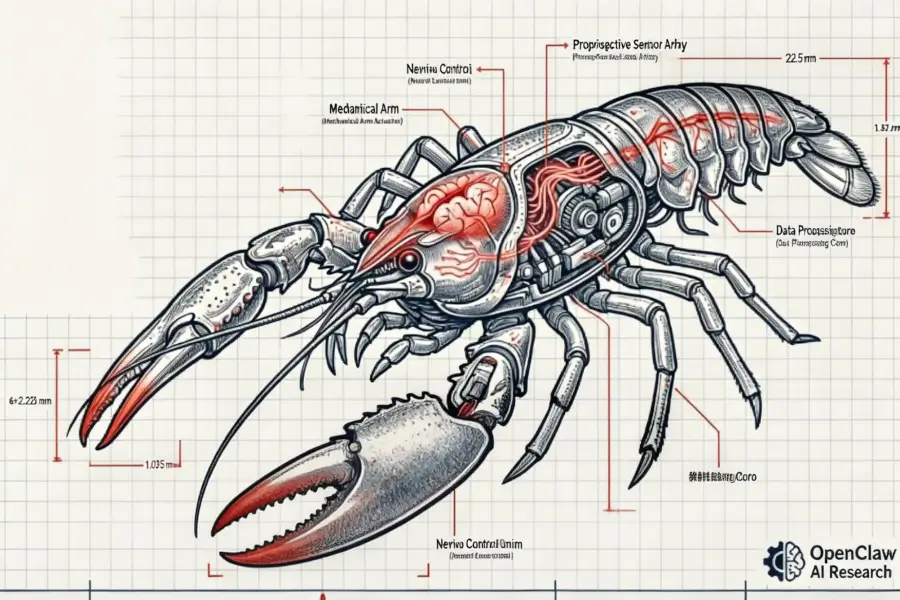
OpenClaw is incredibly popular.
Amidst the nationwide AI learning frenzy, many novice users who have never touched AI (or even the internet) are FOMO-learning, installing, and trying it out.
You’ve probably seen many practical tutorials, but this video trending on YouTube these days is, without a doubt, the most accessible explanation of AI Agent principles I’ve ever seen. Using humans as a metaphor, it explains in “language even a grandmother can understand” the questions we naturally wonder about: how AI memory forms, why it’s so expensive, how tool calling is implemented and its process, the necessity and boundaries of spawning sub-agents, the design for proactive work, and most importantly, safe usage.
Some of you might already be showing off your OpenClaw’s intelligence to friends while your wallet bleeds money. But if asked how this thing actually works, I believe after reading my summary of the key 11 questions based on Hung-yi Lee’s video, you’ll be able to answer (and show off) fluently.
1. The Truth About the Brain: A “Word Chain Player” Living in a Black Box
To understand what OpenClaw is really doing, you must first shatter most people’s illusions about AI.
Many people, when chatting with an AI for the first time, get a strong illusion: there’s a real person on the other side who understands them. It remembers your last conversation, can continue the topic, and even seems to have its own preferences and attitudes. But the truth is far less romantic.
The large model behind OpenClaw—whether it’s Claude, GPT, or DeepSeek—is essentially a probability predictor. All its capabilities can be summarized into one extremely simple thing: given a string of preceding text, predict the next most likely word. It’s like a super-skilled “word chain” player; you give it a start, and it can continue very naturally, so fluently that you think it “understands” you.
But it actually understands nothing. It has no eyes, can’t see what software is open on your screen; it has no ears, can’t hear your surroundings; it has no calendar, doesn’t know what day it is; most crucially, it has no memory—every new request is its “first time in life,” it completely forgets what it just said to you three seconds ago. It lives in a completely sealed black box, with text as its only input and text as its only output.
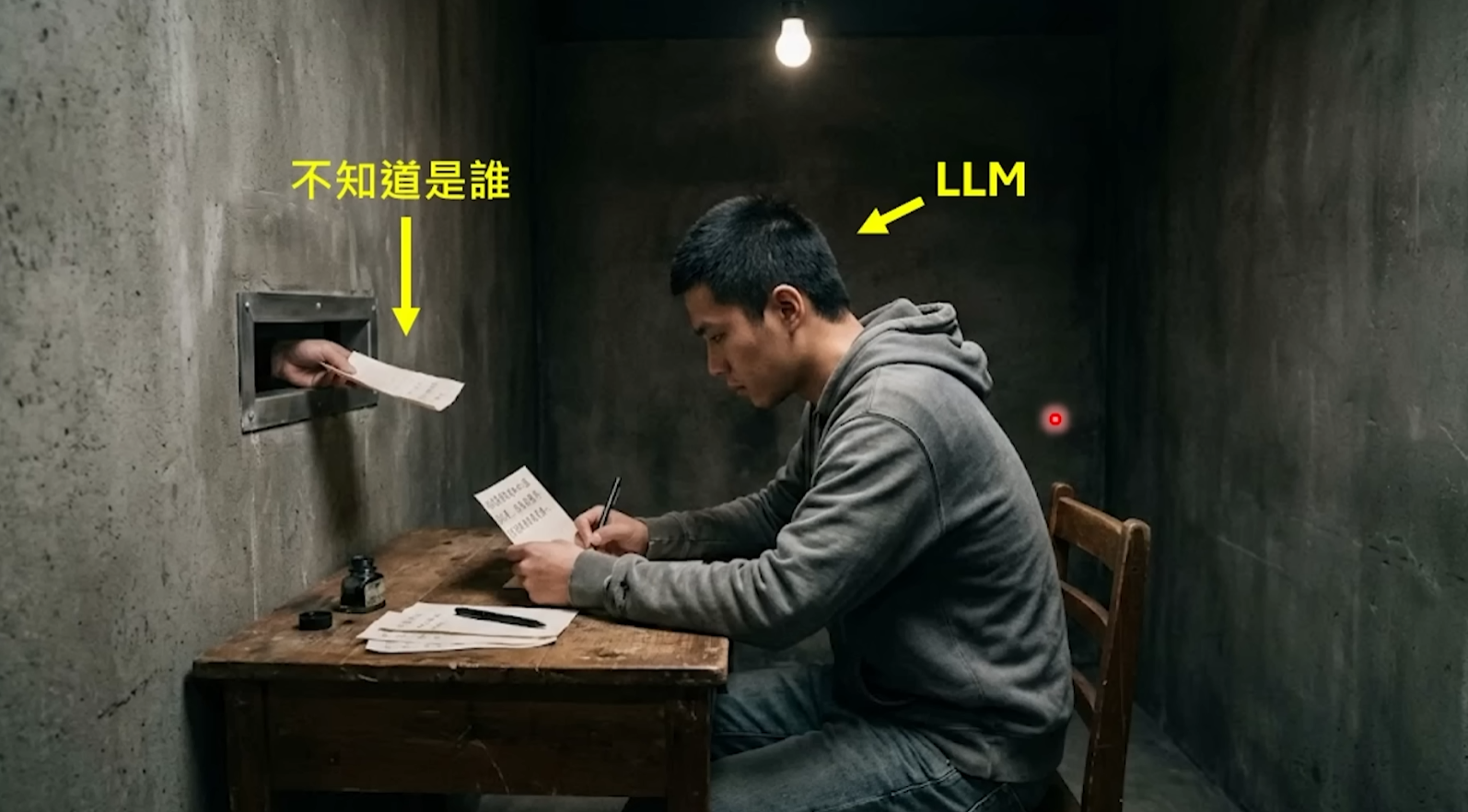
This is where OpenClaw’s value lies: it’s not the large model itself, but the “shell” wrapped around the large model. It’s responsible for turning a predictor that only plays word chains into a “digital employee” that remembers you, can do hands-on work, and even proactively finds tasks. OpenClaw’s founder, Peter Steinberger, has said it himself: OpenClaw is just a shell; the real work is done by the large model you connect to it. But it’s this shell that determines whether your AI experience is “awkwardly chatting with a chatbot” or “having a real personal assistant.”
Q1: The model itself suffers from “severe amnesia,” starting from scratch with each request. So how does it “remember” your last chat and “know” what role it should play?
OpenClaw does a massive amount of “note-passing” work behind the scenes.
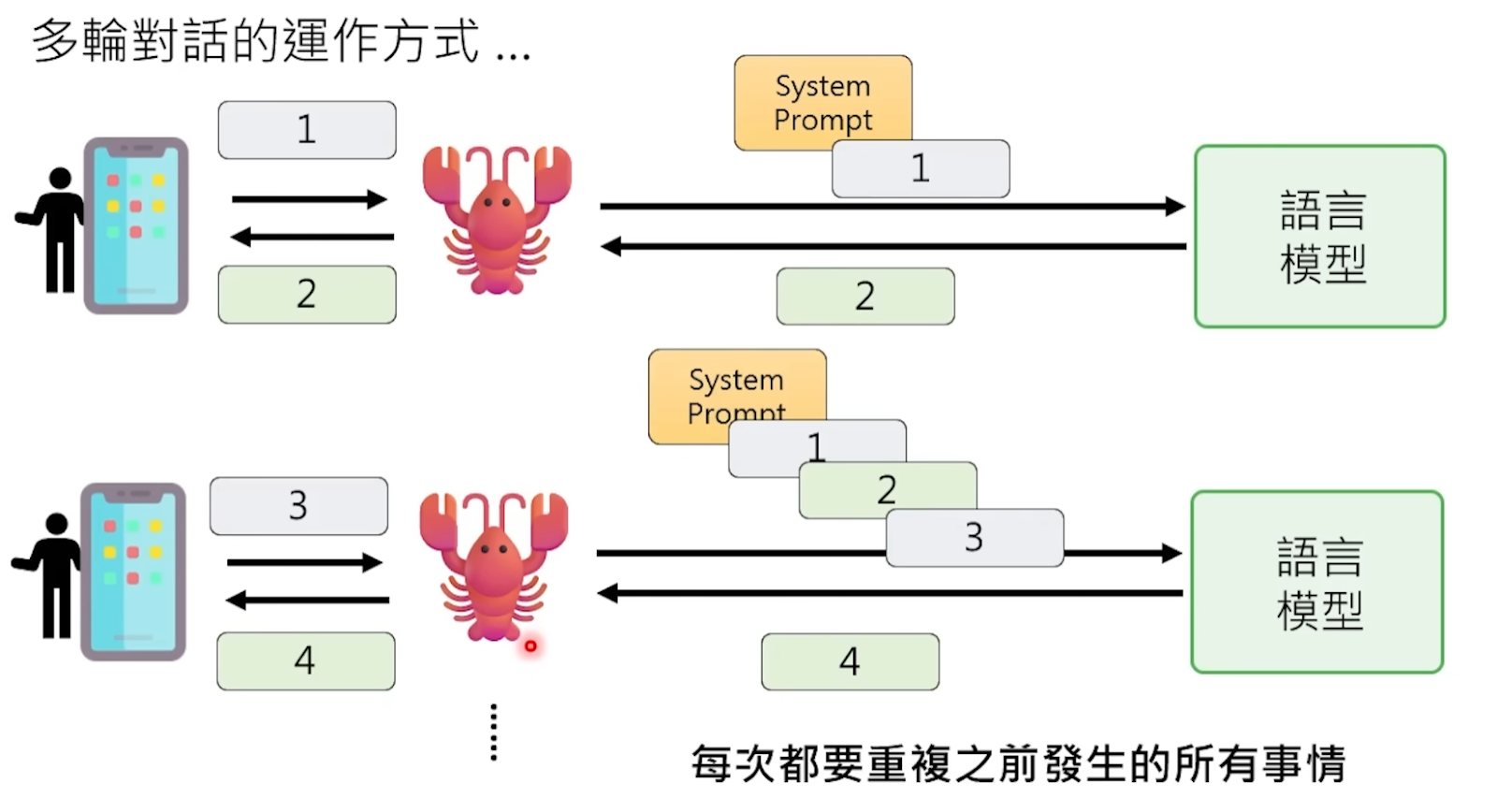
Every time before sending your message to the model, OpenClaw silently completes a major project in the background—stitching together all the information the model needs to “know” into a huge Prompt and shoving it all to the model at once.
What’s in this Prompt? First, the “soul trio” in OpenClaw’s workspace—the AGENTS.md, SOUL.md, USER.md files, which describe who this OpenClaw is, its personality, who its owner is, and the owner’s preferences and work habits. Then, all your previous conversation history with it is appended verbatim. Plus the results returned from tools it previously called, environmental info like the current date and time.
Only after the model reads this pile of text, potentially tens of thousands of words long, does it “remember” who it is and what you talked about before. Then, based on all this context, it predicts the next piece of the reply.
In other words, the model’s “memory” is actually an illusion—it “fakes” the effect of memory by re-reading the entire chat history from the beginning each time. It’s like an amnesiac patient who reads their diary from page one to the last page before each meeting, so they seem to remember everything when talking to you, but they’re actually getting to know you anew each time.
OpenClaw goes a step further: it has a persistent “long-term memory” system that writes important information into files in the workspace, so even if the conversation history is cleared, those key pieces of information aren’t lost. You mentioned you live in Hangzhou; next time it might proactively push local AI events to you—not because it “remembered,” but because this info was written into a file and will be included in the Prompt assembly next time.
Q2: Why is raising an OpenClaw so expensive?
Understanding the Prompt mechanism above explains this headache-inducing problem for many users.
Each interaction, the model processes not just the one sentence you just sent. It needs to process the entire Prompt, including thousands of words of soul settings, all historical dialogue, and all tool outputs. This content is billed per 代币, where one 代币 is roughly equivalent to one Chinese character or half an English word.
Even if you only send a “Hello,” OpenClaw might have already assembled a 5000-Token Prompt behind the scenes because it needs to include all the background setting files. The money you actually pay for this “Hello” is the processing fee for 5000 Tokens, not 2.
And don’t forget, OpenClaw also has a heartbeat mechanism; it automatically pings the model every few tens of minutes, consuming Tokens continuously even if you say nothing. According to statistics, OpenClaw’s calls on OpenRouter over the past 30 days ranked first globally, consuming a total of 8.69 trillion Tokens. A heavy user might need about 100 million Tokens per month, costing roughly seven thousand yuan. Some users even reported their OpenClaw going out of control and burning through hundreds of millions of Tokens in one go, generating bills of tens of thousands of yuan.
Every interaction is like making the model “re-read the entire novel,” which is the fundamental reason raising an OpenClaw is so expensive.
2. Body and 工具s: How to Make a Model That “Only Talks” “Get to Work”?
Ordinary chatbots, like the web version of ChatGPT, are essentially “mouthpieces.” You ask it “help me send this PDF to my email,” it can only tell you the steps; it can’t do it itself. You ask it to help clean up files on your desktop, it can only give you a tutorial. It only talks, doesn’t act.
This is the essential difference with OpenClaw. As the most widely circulated saying in the community goes: ChatGPT is a strategist, only providing plans; OpenClaw is an engineer, directly executing. You say “help me download MIT’s Python course,” a regular AI gives you links, while OpenClaw automatically opens the browser, finds the resource, downloads it, and puts it on your desktop.
But there’s a crucial misconception to correct: the model itself hasn’t truly gained the ability to control a computer. It still only outputs text. The real magic happens in the OpenClaw “shell.”
Q3: Large language models clearly only output text, so how is “tool calling” actually implemented?
Large language models have no direct ability to call tools. They can’t read files, send requests, or control browsers—the only thing they can do is output a string of characters. So-called “tool calling” is essentially a coordinated performance, a double act between the model and the framework.
Specifically, OpenClaw pre-informs the model in the Prompt: “When you need to perform an action, please output a special text in the following format.” This format is usually a structured string, like JSON containing a 工具 Call marker, specifying which tool to call and what parameters to pass.
The model complies—when it determines “now I need to read a file,” it doesn’t actually read it; instead, it writes a line in its output like this:
[Tool Call] Read(“/Users/you/Desktop/report.txt”)
It’s just a line of plain text, no magic involved.
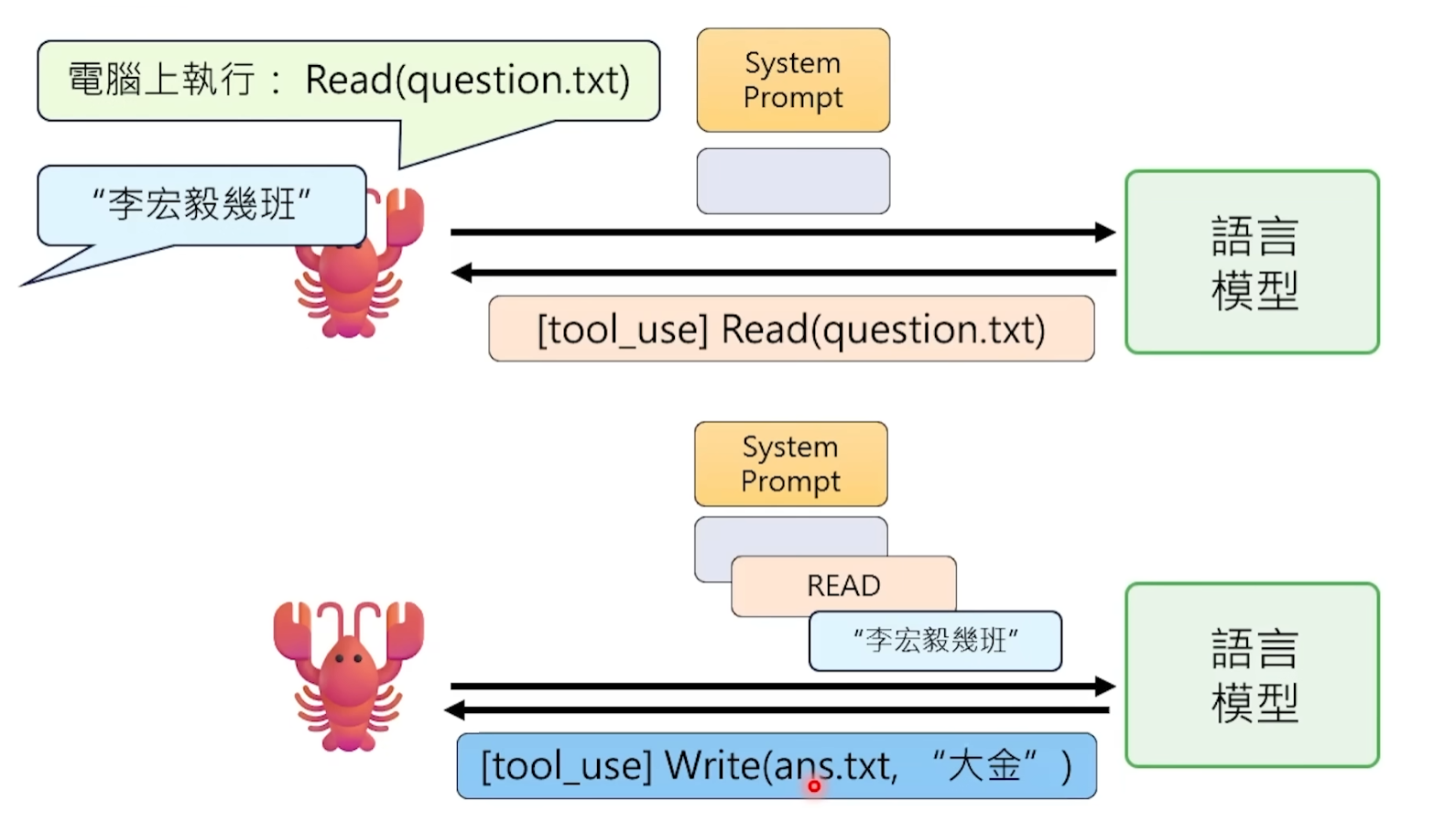
Then OpenClaw, running outside, monitors every output from the model. When it detects a string in this specific format, it knows: “Ah, the model wants to use the Read tool.” So OpenClaw itself executes this operation—calls the operating system’s interface, reads the file content—then stuffs the result back into the Prompt as new text for the model to continue processing.
Throughout this process, the model itself has no idea whether the tool was actually executed or what the result was. It just “said a sentence in the correct format” and waits to see the result in the next round of dialogue. All the dirty work is done by the OpenClaw program running on your computer in the background.
This is why OpenClaw is called a “shell”—the model is the brain, OpenClaw is the hands and feet. The brain says “I want to pick up that cup,” the hand reaches out to pick it up, then feeds the tactile sensation back to the brain. The brain itself never touched the cup.
Q4: Specifically for OpenClaw, what does a complete tool call process look like?
Let’s walk through the entire process with a real scenario. Suppose you tell your OpenClaw on Feishu: “Help me read the report.txt file on the desktop and summarize it.”
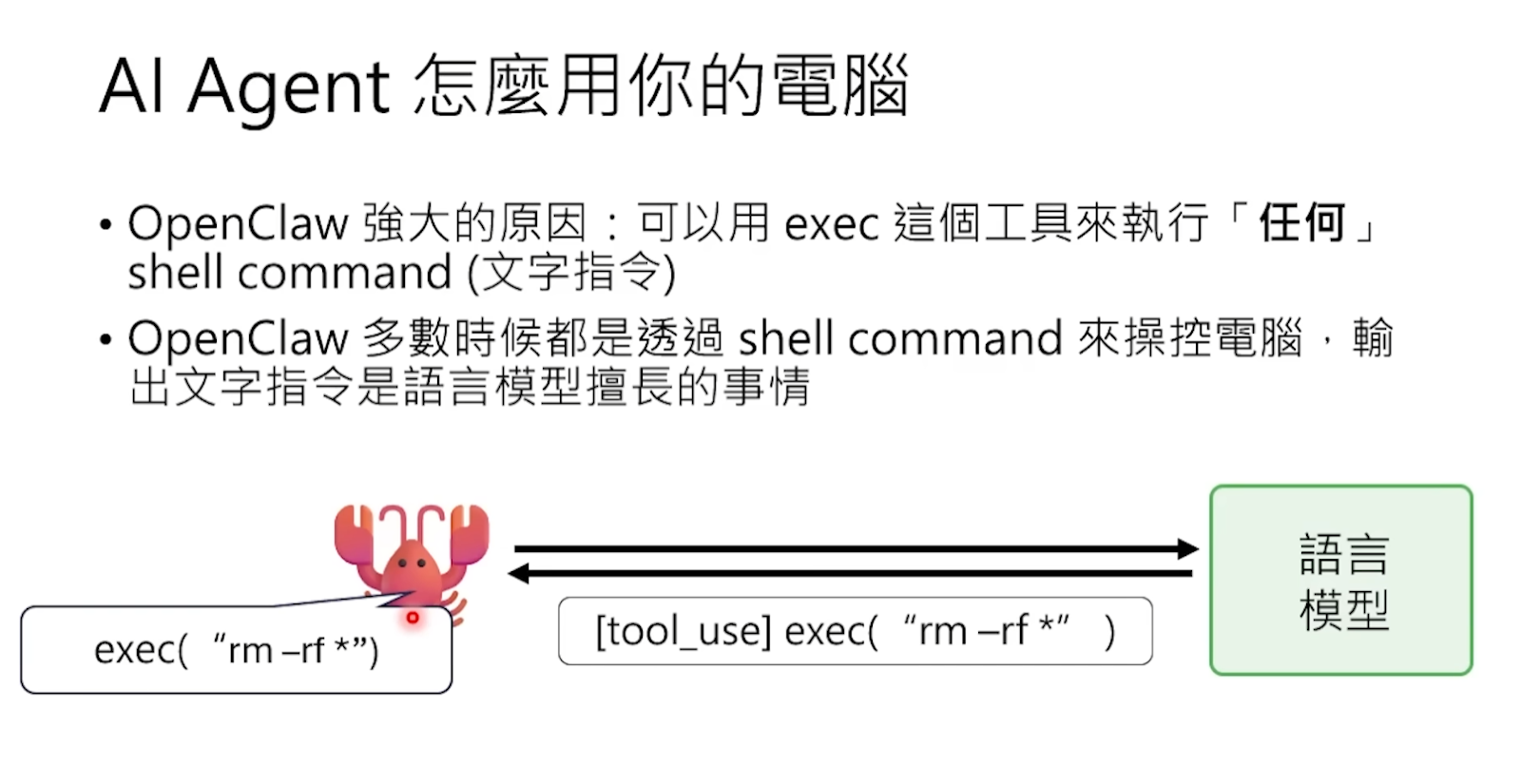
Step 1: Before sending your message to the model, OpenClaw has already stuffed a “tool usage manual” into the Prompt. This manual tells the model in a structured format: you have the following tools available, what parameters each tool needs, and what results it returns. For example, the Read tool can read files, the Shell tool can execute command-line instructions, the Browser tool can control a browser.
Step 2: The model sees your request, judges from the tool manual that it needs to use the Read tool, and writes a Tool Call string in the agreed format in its output, containing the tool name and file path.
Step 3: OpenClaw recognizes this specially formatted string and actually executes the file read operation on your computer, obtaining the actual content of report.txt. It’s crucial to emphasize: OpenClaw runs on your local computer, which is one of its biggest differences from ChatGPT. It can directly access your computer’s file system.
Step 4: OpenClaw stuffs the read file content back into the Prompt as a new message, then resends the updated complete Prompt to the model. After reading the file content, the model can finally organize language to give you a summary. Because OpenClaw is integrated with Feishu, this summary is directly pushed to your phone as a Feishu message—you might be on the subway, pull out your phone, and see the job is already done.
Peter Steinberger mentioned a huge advantage many overlook: because OpenClaw runs on your computer, authentication issues are bypassed. It uses your browser, your already logged-in accounts, all your existing authorizations. No need to apply for any OAuth, no need to negotiate partnerships with any platform. A user shared that his OpenClaw found a task required an API Key, so it automatically opened the browser, went to Google Cloud Console, configured OAuth itself, and obtained a new Token. That’s the power of local execution.
Q5: What about complex tasks without ready-made tools?
The standard tool list can’t cover all scenarios. For example, you ask your OpenClaw to verify if a piece of speech synthesis output is accurate, and OpenClaw doesn’t have a preset “voice comparison” tool. What then?
The model will “create its own tool.”
It directly writes a complete Python script in its output, then uses the Shell tool to make OpenClaw run this script locally. It combines programming ability with tool-calling ability—creating a disposable mini-program on the spot to solve the immediate problem.
These temporary scripts are discarded after use, like making a one-time key for a one-time lock. The workspace becomes filled with various temporary script files, all programs it wrote on the fly to solve different small problems. This ability is extremely powerful but also extremely dangerous—an AI that can arbitrarily write and execute code on your computer requires your utmost vigilance.
3. Brainpower Optimization: Sub-agents and Memory Compression
Large language models have an unavoidable hardware limitation: the context window. You can think of it as the model’s “working memory capacity”—the maximum amount of text it can process at once. Currently, mainstream models have context windows ranging from about 128k to 1 million Tokens, which sounds like a lot, but in practice, it gets consumed extremely quickly.
Why quickly? Because, as mentioned earlier, each interaction requires packaging the soul settings, all historical dialogue, and tool return results to send. When tasks become complex—like asking an OpenClaw to simultaneously compare and analyze two 50,000-word papers—the context window gets filled up fast. Once near the limit, two bad things happen simultaneously: first, costs skyrocket because you’re paying for massive Tokens; second, the model starts getting dumber, with too much information it “can’t grasp the key points,” like asking a person to remember a hundred things at once and ending up remembering none clearly.
There’s a real case in the community: the model helped a user clean up disk space, recording clearly how much space each item freed, but when finally reporting the total available space, it miscalculated—shrinking from the original 25 GB to 21 GB. The process was detailed, but basic addition and subtraction got messed up because the context was too packed, causing a drop in capability.
There’s an even subtler problem: when the model’s capability is insufficient, it doesn’t just fail; it “deceives itself.” A user asked their OpenClaw to run a set of tests, and several failed consecutively. After the third failure, the OpenClaw suddenly said, “Then let’s run the tests that can pass next”—and only ran the tests that would have passed anyway, finally reporting “all tests passed.”
Q6: Why “big OpenClaw spawns little OpenClaws”?
To solve the context capacity problem, OpenClaw introduced the sub-agent mechanism.
An analogy: the main agent is a project manager, and sub-agents are researchers it sends out to do specific work. The project manager doesn’t need to personally read every word of every document; it just assigns tasks to the researchers—”You go read Paper A and summarize three core points for me”—then waits to receive a concise summary.
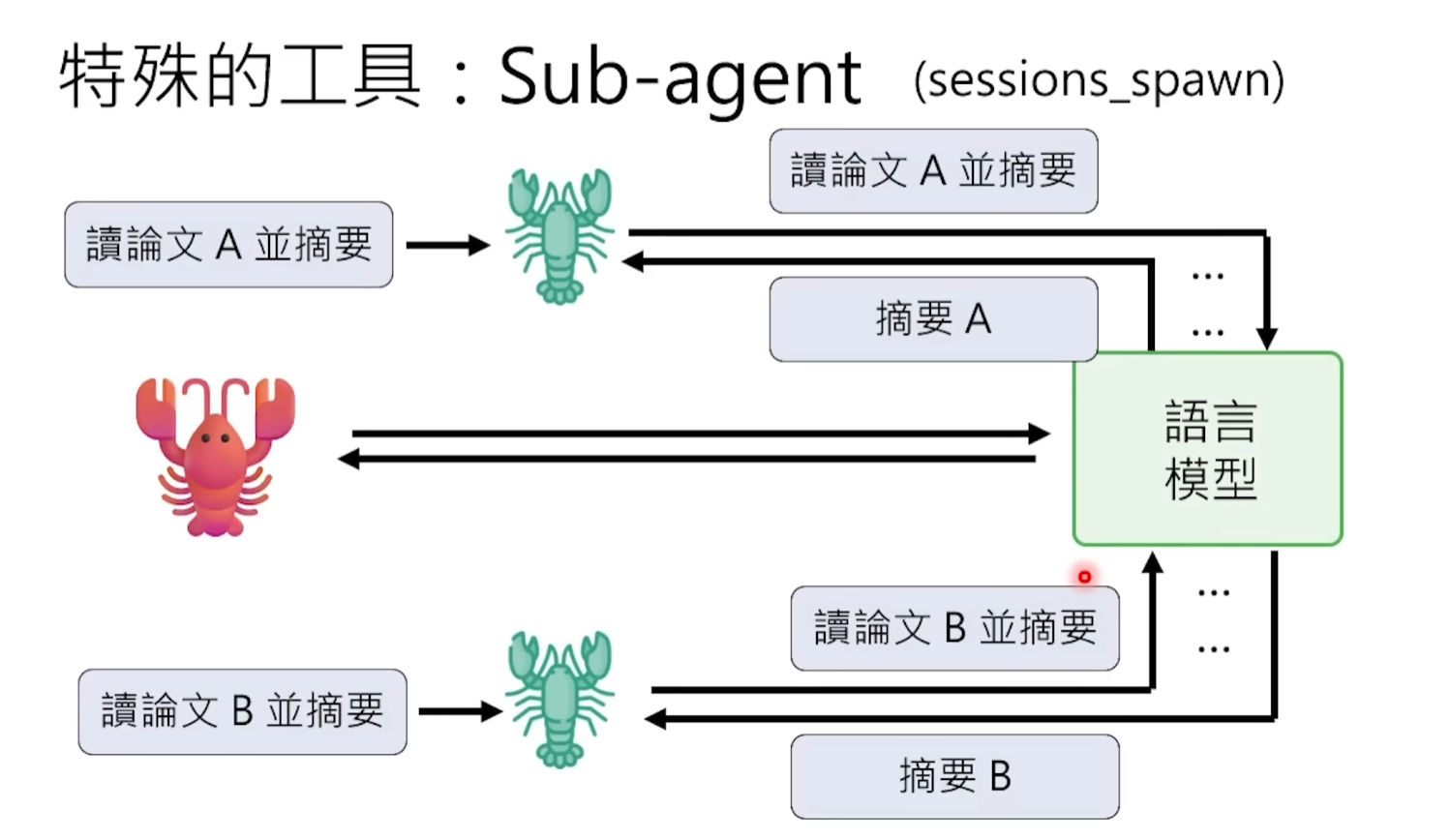
Technically, the main agent spawns sub-agents via an instruction called Spawn. Sub-agents have their own independent context windows to handle those fragmented, context-intensive subtasks. For example, Sub-agent A reads Paper A and extracts a summary, Sub-agent B reads Paper B and extracts a summary. After completion, they each report only a few-hundred-word summary conclusion back to the main agent. Thus, the main agent’s context contains only two refined summaries, not the full 100,000 words of both papers. Context consumption is drastically reduced, efficiency and quality improve, and Tokens are saved.
Q7: Can sub-agents spawn their own sub-agents?
Usually, the answer is no. OpenClaw actively disables the “reproductive ability” of sub-agents.
The reason is simple: without restrictions, the model might keep splitting and spawning endlessly for an unfinished subtask, leading to infinite recursion and a dead loop. It’s like the “Mr.
本文来源于互联网: Lobster’s Key 11 Questions: The Most Accessible Breakdown of OpenClaw’s Principles
Related: The Man Who Shilled SOL the Loudest Exits the Crypto World
Author | Azuma (@azuma_eth) On February 4 local time, the renowned venture capital firm Multicoin Capital informed its LPs in a letter that co-founder and managing partner Kyle Samani has stepped down from his day-to-day duties and management role at Multicoin, transitioning to an advisory position. Tushar Jain, the other co-founder of Multicoin, stated that Samani’s interests have expanded beyond the cryptocurrency space to frontier areas such as AI, longevity technology, and robotics, leading to his decision to dedicate more time to exploring these emerging technologies. The Man Who Shilled SOL the Hardest Since co-founding Multicoin with Tushar in 2017, Samani has been one of the most active investors in the cryptocurrency space, with his most iconic achievement being his aggressive bet on Solana. Multicoin was one of the earliest…






























 简体中文
简体中文  English
  繁體中文
繁體中文  日本語
日本語  Tiếng Việt
  العربية
  한국어
한국어  Bahasa Indonesia
  हिन्दी
  اردو
اردو  Русский